


This post is going to explain how to create strong search filters on eBay to target relevant cards to buy. This is a very important skill to master. There are hundreds of thousands of cards listed at any given time, and the vast majority of them are unprofitable to grade. As a result, you need some sort of filter to remove the unprofitable cards, otherwise you will spend hours and hours manually searching through listings.
There is a fundamental tradeoff between seeing all the cards you might be interested in, and being overwhelmed by thousands of listings you will never buy. The more you filter, the more things you might miss, so this is something where you need to find the right balance.
In our case, our goal is to only see Pokémon cards and sports rookie cards that are in a certain price range, and therefore could be profitable for us to grade. We also aim to filter out any cards that are already graded, or any listings from big sellers who grade cards themselves. Some of these filters might be right for you, while some may be too limiting.
And before we get started, I recommend you also check out my Guide to Finding PSA 10 Candidates on eBay here.
How to Use eBay Search Filters
Auction vs Buy It Now (BIN) Filters
We use different filters for auctions and BINs because we’re trying to accomplish different things.
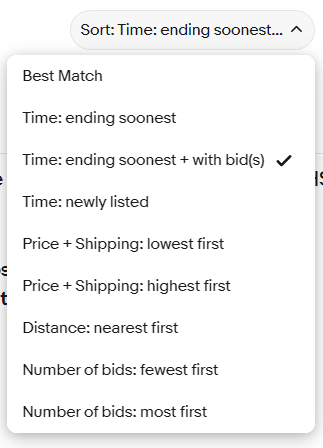
For BIN listings, we filter by newly listed. The goal is to buy good deals quickly before others find them.
For auctions, we filter by ending soonest. We typically look at auctions a few hours before they end, assess the card condition and market value, then place our bids. We also set a minimum of 1 bid to filter out overpriced auctions or listings that haven’t generated interest. If no one else is interested in a card, you probably won’t be either. You can see how to do this below.
Minimum Price
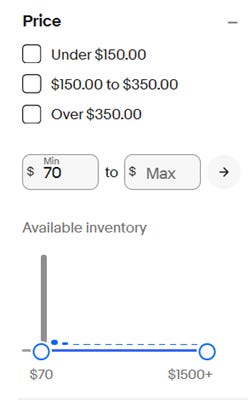
In general, it’s not profitable to buy and grade cheap cards. Because there are far more listings in the $0-$100 range than any other price bucket, setting a minimum price filter around $100 is extremely helpful in removing irrelevant listings. You can find this in the side window of your eBay page.
Boolean Searches
This allows you to search for multiple things at the same time. Here’s a simple example. If I search for (Drake Maye, Charizard), I will get results that include either Drake Maye or Charizard.
This has a lot of important uses. For example, if you decide you want to specifically target Drake Maye, Shohei Ohtani, Cal Raleigh, and Victor Wembanyama, you can search for (Maye, Ohtani, Raleigh, Wembanyama).
Compound Boolean Searches
You can also do two Boolean searches in the same search. For example, you can combine the search above with (RC, rookie) to ensure that all results are rookie cards. Note that it’s important to have RC and rookie as search terms because different sellers label their cards differently. In total, the search would look like this:
(Maye, Ohtani, Raleigh, Wembanyama) (RC, Rookie)
Finally, if you want to mix Pokémon and sports, here’s how you can do it.
(Maye, Raleigh, Charizard, Pikachu) (RC, Rookie, Pokemon, Pokémon)
If a listing has any one of the four terms from the left, and any of the four terms from the right, you’ll see it in your search. This will either return a result that is a rookie card (Maye or Raleigh) or a Pokémon card (Charizard or Pikachu).
Exclude Operators
This is very useful in many cases. The most obvious of these is when looking for cards to grade. Because we don’t want cards that are already graded, we use an exclude operator to filter them out. That will look like this:
-PSA -BGS -TAG -SGC -CGC
It’s pretty straightforward. Just use a minus sign then write exactly what you want to exclude directly after.
This can be useful in other instances as well. If you’re looking for a Topps Chrome base card in specific, it can be useful to include “-refractor” at the end of your search.
Excluding Sellers (Advanced Search)
If you’ve read my guide to finding PSA 10 candidates on eBay (linked here), you know we avoid buying from large consigners and sellers who grade cards. You can remove their listings from your searches using advanced search features.
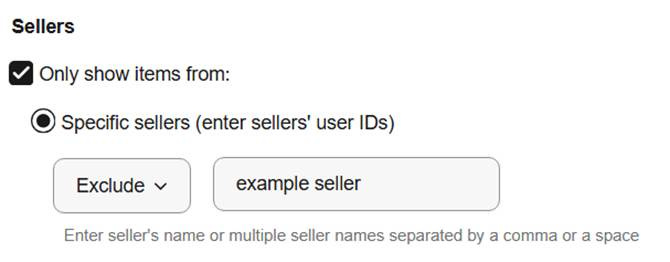
Go to your search and click “Advanced.”

Scroll down to the “Sellers” section, select “Exclude,” and type in any sellers you don’t want to buy from.
Terminology
Card lingo on eBay is very specific, so it’s helpful to know the right search terms. Terms like “RC” for rookie card, “auto” for autograph, and “/25” to signify a numbered card with 25 copies are standard.
In fact, in a lot of cases if I’m looking for a Topps Chrome Rookie Autograph Purple Speckle /199, I’ll just shorten the search to “Topps Chrome Auto RC /199.” There’s an art to figuring out the perfect search term to find what you’re looking for.
Experimenting
You can adjust these filters based on how much time you have to search through eBay listings.
For example, you can do a player-specific search like I showed above, or you can do a general search to look for all Pokémon cards and sports cards. That would look like this:
(RC, Rookie, Pokémon, Pokemon)
You can also increase your minimum price when you have less time and decrease it when you have more time. You can even include graded cards in your searches to look for deals on those as well.
For us, I’ve created a player-specific BIN filter that works well when I’m out of the house and don’t have time to do much research before buying. On Sundays, when tons of auctions are ending, I usually increase my minimum price threshold to save time. Experiment with this and find what works for you.
Our Searches (and why they work)
(rc, rookie, pokemon, pokémon, tcg) -psa -bgs -sgc -lot -cgc -booster -box -set -plush
This is the general filter I use for auctions. I set a minimum price of $70 and filter by ending soonest with at least one bid. This shows all sports rookie cards and TCG cards while excluding graded cards, unopened products, and toys.
Note that this threshold is lower than for BINs, since the listed price reflects the current bid rather than the final sale price.
(caitlin clark, maye, njigba, shai, judge, raleigh, ohtani, caleb williams, wembanyama, garchomp, mewtwo, charizard, konnor griffin, umbreon, nix, trout, yamamoto, skenes, mahomes) (rc, rookie, pokemon, pokémon) -psa -tag -cgc -bgs -plush -booster -book -lego
This one is longer, but the idea is similar. I use this for BINs with a minimum price of $100, filtered by newly listed. This shows rookie cards of sports players we’re targeting and Pokémon cards of characters we’re targeting. This works well when I’m on the road, since I roughly know the market values for most of these cards without doing additional research.
And one final note. Good filters won’t help you grade profitably unless you can find gradable cards. You can find my guide to finding PSA 10 candidates on eBay here.
I would love to hear from you! If you have any questions or comments, or just want to say hi, message me at the link below!
This is a phenomenal piece -- great job!