
The Complete Guide to PSA Grading: How to Get More PSA 10s
This guide to will show you everything you need to know to determine if your card will grade as a PSA 10. We’ll focus on the 4 major categories, centering, corners, edges, and surface, and also look specifically at some of the issues that are acceptable on PSA 10 cards.
For a bit of background, my business partner and I have graded almost 1,000 cards with over 60% of these grading as PSA 10s. We primarily buy and sell Ultra Modern (2017 and newer) sports cards and Pokémon cards worth between $100 and $3,000.
And before we start, here are a couple other guides you might find helpful:
Finding PSA 10 Candidates
PSA gives guidelines describing which cards will grade as Gem Mint 10s. I think the biggest thing to know is that cards DO NOT need to be perfect to grade as PSA 10s. While PSA is very picky about certain defects, we have gotten good results in spite of regularly submitting cards with minor defects. The key is to know which defects are acceptable, and which are not. We’ll look through this step by step.
Determining Centering: 55/45 Guidelines
Based on PSA guidelines, a PSA 10 card must have 55/45 front centering or better, and 75/25 back centering or better. Honestly, the 75/25 on the back is quite lenient, as even cards that look very off-center still fall within this threshold. But with that said, the following evaluation method can be applied to either the front or back of any card.
Some cards have clearly defined borders, and some do not. You’ll find that centering is a lot easier to measure on the cards that have defined borders.
I’m also not a fan of centering tools or centering apps based on pictures. We are old school and like to just measure with a ruler. I find this makes it much easier to be precise, and this matters if you’re trying to decide if a card is 56/44 or 55/45 (although PSA does sometimes gem cards that are technically a bit outside of 55/45).
Let’s look at this 2018 Bowman Chrome Shohei Ohtani Rookie Card as an example. I’ve marked the borders in blue for reference.
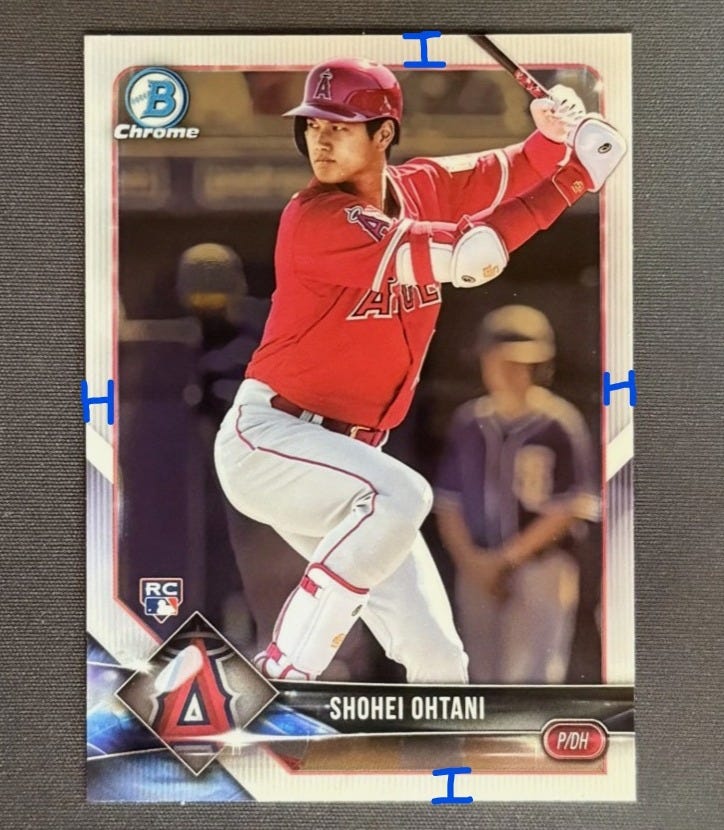
The steps below show how we calculate this. This methodology can be applied to both Top/Bottom and Left/Right centering.
Measure the left and right borders.
For example let’s say the left border is 5 mm and the right border is 6 mm.
Add them together to calculate the total border width (11 mm).
Divide the length of each border by the total border:
Left Border: 5 / 11 = 45.5%.
Right Border: 6 / 11 = 54.5%
In this example, left/right centering is 54.5/45.5.
It’s trickier to find the centering for a card without defined borders. Take for example this 2024 Bo Nix Phoenix Color Blast Rookie Card.
For cards that don’t have borders, you should look to cards that have already graded as PSA 10s as your guide. Look for the distance between things like RC logos, names, and logos from the border and calculate the ratio similarly to bordered cards.
And one final thought for this section. PSA changed the grading standard for front centering from 60/40 to 55/45 earlier in 2025. As a result, you should look for cards with higher certification numbers to be your guide for cards without defined borders. We generally look for certification numbers of 100000000 or higher. Lots of cards with certification numbers below this are actually too off-center to grade as 10s under current PSA standards.
Evaluating Corners: Minor Dings vs Heavy Wear
Corners are fairly straightforward to evaluate. According to PSA, a PSA 10 card must have 4 perfectly sharp corners, but from experience I know that there’s a bit more lenience here than their policy suggests.
More realistically, a card can have one or two less than perfect corners, including minor dings or softness.
For instance, a lightly dinged corner like this one is likely still a candidate to grade as a PSA 10:
… while this one likely is not:
It’s probably smart to just try to submit cards with 4 perfect or very near perfect corners as a beginner, but as you get some positive results, I think it makes sense to test out less perfect cards.
Evaluating Edges: Jagged Cuts vs Other Damage
Edges and surface are the weird ones to me. I think the majority of the time we have a card grade as an 8 or less, it’s because of one of these two categories.
Edges don’t have to be perfect, but you need to be very careful when submitting cards with edge issues. Rough factory cuts on edges can be acceptable, but generally chipping or damage that extends into the surface is not (and often leads to PSA 8s or worse).
Take a look at the 2008 Topps Update Clayton Kershaw below that we submitted to PSA. The edges aren't perfectly smooth, but there’s no damage visibly bleeding onto the surface (the fact that the surface is white helps).
On the other hand, edge defects that bleed into the surface tend to kill a card’s chances of grading as a 10, and in many cases will cause the card to be a PSA 8 or lower.
This Bedard card is a good example. There’s a few products that we grade really poorly on and this is one. These edge issues may look minor, but in our experience they have consistently led to PSA 8s. Avoid cards with edge issues that cause whitening on the actual surface on the card.
The 2024 Micro Mosaic Jonathan Brooks Rookie Card below is another example of an edge issue that we generally try to avoid submitting to PSA. We have had a few Micro Mosaic cards with similar issues grade as 8s and 9s this year.
And here is one more example of a 2025 Bowman Chrome Roki Sasaki Auto that we decided not to submit.
Surface: Print Lines, Indents, Dimples, and More
Surface is definitely the most difficult part of the card to evaluate. Many surface marks can only be seen with certain lighting.
The best approach for seeing all possible marks is to have a small desk light, and to move the light over all parts of the card at different angles, although you can also do this with an overhead light. I think that anytime someone submits a “perfect” card and gets a PSA 8 or worse, it’s most likely because they missed a hard to find surface defect (I’ve been there).
Because each surface issue is treated a bit differently, we’re going to look through them one by one with examples for each.
The Two Categories of Print Lines
Most print lines on Ultra Modern cards are only visible in certain lighting. Take for example this Luka Doncic card.
Without proper lighting, these print lines would not be visible on this card. We’ve found that print lines like this have very little impact on the grade of that card. We very rarely decide not to submit a card because of back print lines. Similar print lines on the front are a bit more impactful, but we’ve still found that these can grade as PSA 10s.
Some print lines are more noticeable and more impactful. The Baker Mayfield Prizm Auto Rookie Card below is a good example of this.
This print line can be seen in all lighting and basically guarantees this won’t grade as a 10.
Scratches & Marks
Like print lines, when it comes to scratches/marks, you need to consider if the marking is clearly visible in all lighting.
Additionally, you will need to consider the depth of the mark. A surface level marking that can’t be seen without proper lighting is a much smaller issue than a deep mark that is clearly visible in all lighting.
Here is an example of scratches on a 2018 Topps Chrome Shohei Ohtani Rookie Card.
These scratches are somewhat light. They don’t run super deep into the card and are not very visible without direct lighting. However because there are a lot of scratches, we did not submit this card to PSA. But if a similar card had the same type of scratches but only 1 or 2 of them, we would have considered submitting.
Indents: A Card Killer
This is the category that leads to the most PSA 8s and lower. Indents are hard to find without proper lighting and significantly hurt the grade of your card.
To detect an indent, look for markings on your card under your desk light. If it has texture to it, it’s an indent. We do not submit cards with indents.
Below is an example of an indent on the back of a 2023 Optic Victor Wembanyama Rookie Card which we decided not to submit.
And here is a 2024 Bowman Anime Yoshinobu Yamamoto Rookie Card which we also did not submit.
Dimples: An Acceptable Factory Flaw
I intentionally put dimples last, because they’re almost like a weird exception to the indent rule. Dimples are small circular indentations, and they are a very common factory defect on Ultra Modern Panini sports cards. PSA tends to be more lenient on dimples than other surface defects. We’ve found that cards can grade as Gem-Mint 10s even with multiple dimples on either the front and/or back.
As a separate point, I think it’s important to note that if the dimple is a factory defect, it’s generally acceptable, but similar issues that were not from original production should be treated more like an indent. This is tricky, and I think the only way to get a good grasp on this is through experience. With that said, I’ll show an example anyway.
Here’s an example of a Drake Maye Prizm Silver Rookie Card we submitted to PSA. These 2024 Prizm Football cards had horrible quality control, and every copy we’ve gotten has had at least one dimple. And yet, we’ve graded really well on these.
In spite of 4 clearly visible dimples on the front surface, we feel that this card also has a chance of grading as a 10.
In general, this is a very common defect on most Panini sports cards from the last decade or so. Over time, you’ll get a feel for which product lines these are common on, and which product lines they are not.
Other Pro Tips to Getting More PSA 10s
Here are a few more things to keep in mind as you get started with PSA grading.
Pack Fresh Doesn’t Mean PSA 10. Evaluate all cards skeptically.
Use Expected Value calculations to evaluate the profitability of your submissions (more on that here).
Wipe off fingerprints and dust with a microfiber cloth before submitting.
Issues on the front are more impactful than issues on the back.
Imperfect cards can grade as 10s, but you should be aware of all issues on a card before submitting it
Take notes on the condition of all your submissions and read them after you get results. It helps to constantly be learning.
And if you made it this far, don’t forget to subscribe to the newsletter!


