


One of the keys to buying profitable inventory effectively is knowing what to buy. Given that there are hundreds of thousands of cards on eBay (if not more), you need a methodology to narrow them down. This post will walk you through our process for doing this.
We’ll break this into two parts. The first will be how to screen for cards that have a high chance at being profitable. The second is a quick rundown of how we use Expected Value in this specific place.
How to Screen Effectively
The goal of the screen is to filter out any cards that are either unlikely to be profitable, or not abundant enough to be worth researching.
Recently we’ve been using Market Movers for this. If you haven’t used it before, it’s a tool that tracks recent sales for raw and PSA graded cards. The key piece that has been helpful for us is that beyond just showing pricing for individual cards, it also shows the volume of sales in a given time period and the market trend.
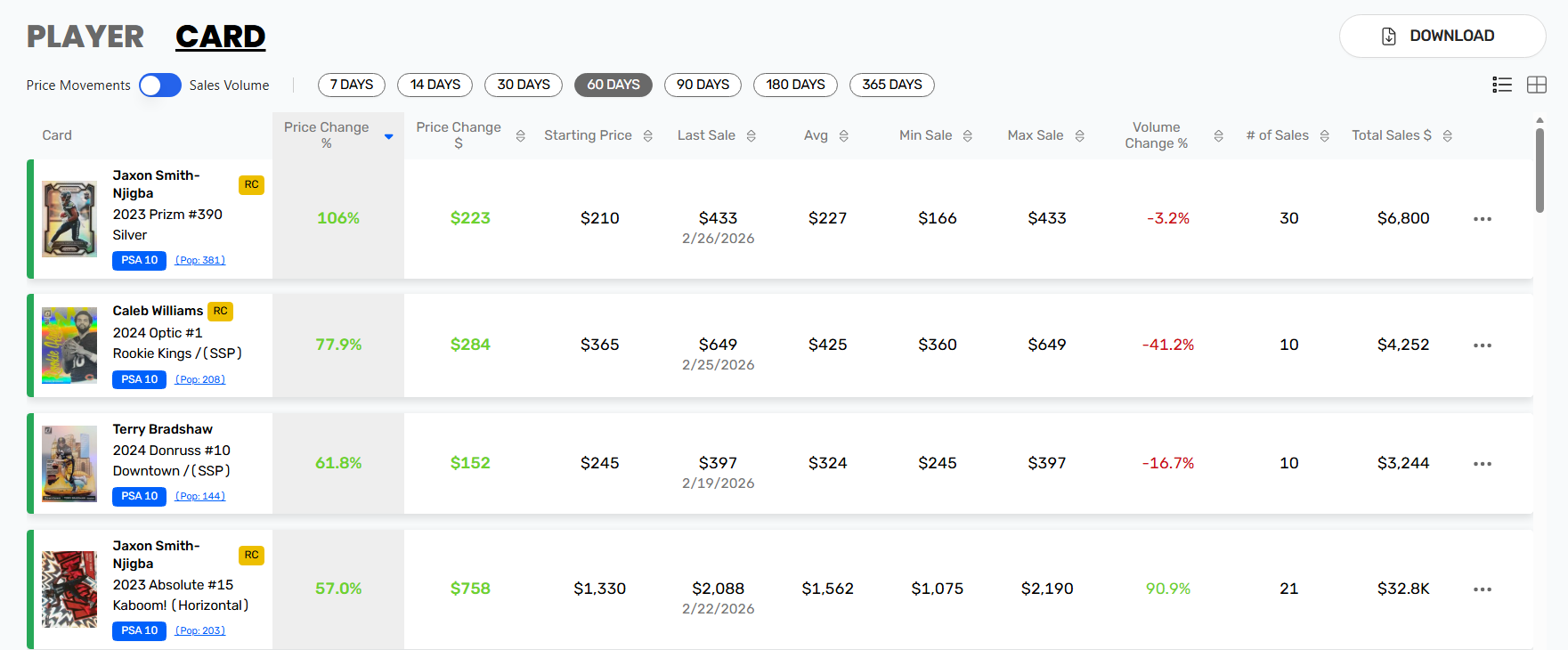
Once this is setup, we usually go through the three major sports and Pokémon with a set of screens to identify potentially profitable cards. These are the 3 screens that we apply:
1. Minimum PSA 10 Value
This isn’t a hard rule because I know some graders that do well on lower value cards. But for us, we find that cards worth $300 or more as PSA 10s have a higher chance of being profitable than cards under $300 (you can read more about this here). Regardless of what price you choose, having some sort of price threshold will help you eliminate a large majority of the cards you aren’t actually interested in.
2. Minimum Sales Volume
We set this differently for Pokémon and sports, but the general idea is that we want to look only for cards that are abundant. There’s no reason to spend time researching a card that you’ll never actually see on the market. For sports, we usually look for cards with at least 5-10 sales in the last 60 days, while you need to set the threshold at 20 or higher for Pokémon since the popular Pokémon cards typically have much larger print runs than sports cards.
3. Price Momentum
Again, this is not a hard rule, but more of something that points us in the right direction during our market research. We’ll usually look for cards that have increased in value over the last 60 days. Why? Because PSA 10 values tend to lead while raw values tend to lag. If the PSA 10 has increased in price but the raw value has yet to catch up, this creates a strong window for profitable grading.
This has led us to target Konnor Griffin, Shohei Ohtani, Victor Wembanyama, and Drake Maye (pre-Super Bowl) recently. Not because we were predicting these markets would rise, but because the Expected Values of grading these cards were significantly higher than raw prices.
The obvious risk with momentum buying is purchasing cards at the peak of their market value. But buying at highly profitable prices is your cushion against that. If you’re buying for significantly below Expected Value, you have margin to still make solid profits even if markets decline. And players who are already hot often continue rising longer than you might expect, as has been the case with Shohei Ohtani over the last couple of years. The point isn’t to predict markets, it’s to buy at prices where the math is so good that you will come out ahead on average regardless of where prices go.
From here, every card that makes it through the prescreen gets run through our EV model. This is where we decide whether a card is actually worth buying, and at what price.
After The Prescreen: Building Your Targets
Once a card passes the prescreen, we evaluate its Expected Value relative to its raw price. We have a spreadsheet built out with conditional functions that allows us to do this very quickly.
For those of you who are unfamiliar, I’ve added the formula for calculating Expected Value below, but you can read the full guide to EV here.
EV = PSA 10 Value x (Gem Rate) + PSA 9 Value x (100% - Gem Rate) - Grading Costs - Selling Fees
By inputting the PSA 10 value, PSA 9 value, Gem Rate, and raw price, the spreadsheet gives us the Max Bid, Expected Profit, and Expected ROI of the card. The Max Bid is the EV divided by 1.25 (i.e. the max price we can pay to generate a 25% ROI), Expected Profit tells us the average profitability from buying the card raw and grading it, and the Expected ROI is just the Expected Profit divided by the raw price.
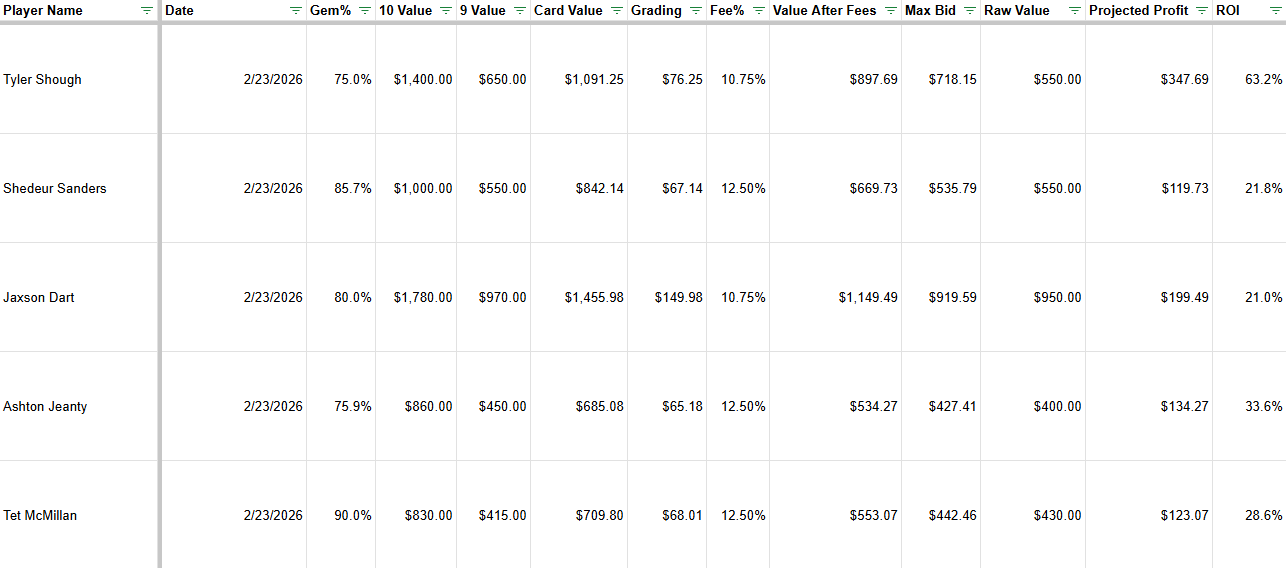
We also include the card name and the date of recording the data. We then use this spreadsheet as a reference when looking for cards to buy. Having this data gives us two main advantages: speed and clarity.
Speed means that when one of the cards we’ve researched hits the market, we know exactly what we are willing to pay for it. This means that we can get great deals on newly listed items because we can recognize underpriced cards faster than other buyers.
Clarity means that we know what we’re interested in, and we don’t need to waste time on cards that we’re not interested in. We build search filters specifically to target the athletes and Pokémon that are profitable. You can read more about building search filters here.
Takeaway
Both the screen and the EV model are prep work. None of this is designed to lead to purchases right away, but if done right it should make your entire process much more efficient. I know that it has for us.
Awesome